
How do I subscribe for a Paid Plan?
At any point during your free trial, you can review the Bablic plans and pricing on your Account page on your Bablic Project. Your Account page is available on the left hand menu under Admin.
Choosing your Bablic plan is a three step process:
Step 1
Set the traffic slider at the top of the page to the value that most closely matches the average monthly traffic received on your website. This is not translated traffic, but overall site traffic.
Each value on the traffic slider sets a predetermined cap on the amount of translated traffic allotted to each tier.
For example, if you receive ~45,000 page-views per month on average, select 50K on the slider. You will see that the 50K traffic tier includes up to 25K translated page-views per month:
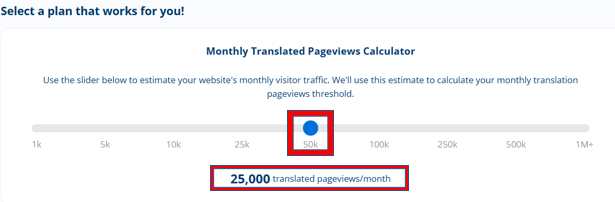
A lot of users don’t necessarily know how many translated page-views they'll need each month – but most users DO know their overall site traffic. So the idea of the traffic slider is to make it easy to pick a Bablic plan based on a familiar metric. The slider will determine a reasonable translated traffic threshold each month based on your selection.
Step 2
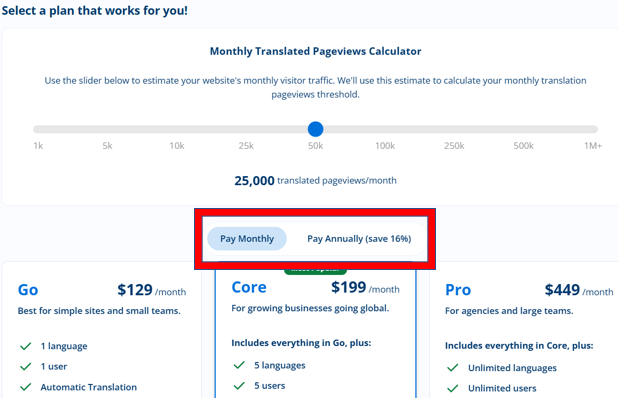
Decide whether you want to pay monthly or annually, and set the toggle accordingly. The toggle defaults to monthly. Annual plans are discounted by 2 months.
Step 3
Choose the best plan from the 3 options below based on your website's requirements - Go, Core or Pro. You can find a detailed feature list under each plan that will help you decide on the right fit for your project.
Submitting a Payment
Once you have selected your plan, click the blue "Continue to Check Out" button on the right side of the page.
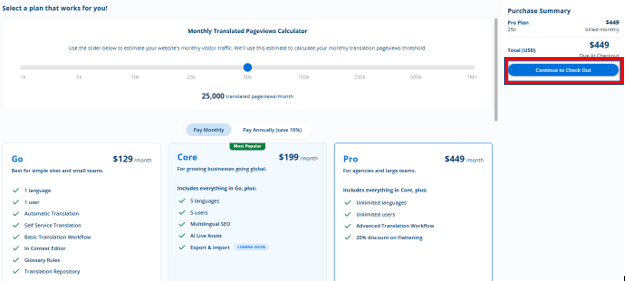
And fill in your payment details to complete your purchase and activate your plan.
If you have questions or experience any issues, please reach out to support@bablic.com.