
Prerendering overview
What is Prerendering?
Prerendering is a process that supplies bots with a stripped-down HTML version of your site that’s easy for them to crawl. Non-bot users will still see the fully optimized JavaScript version that is more attractive and usable.
Once your website is crawled (indexed) for translation with Bablic, a flattened version of your site is available through an API set. This version is a plain HTML representation of your original page’s content that has been translated into the target language.
How To Use Prerendering for SEO Optimization?
The general concept of prerendering is to serve up a simplified HTML page when the requesting user-agent is a known SEO bot or SEO bot IP. If the requesting user-agent is a user, the website serves up a “rich” JavaScript page. Suppose the website has a simplified Bablic page, but JavaScript is detected. In that case, it will redirect to the rich experience to prevent real users from accidentally seeing the simplified version.
This traffic sorting occurs at the CDN (content delivery network) or WebServer (e.g., NGNIX) level. The table below is an example of this process.
| User Agent | URL to Serve |
| Normal | https://www.example.com/fr/seo-example |
| Web Bot | www.onelink-edge.com/xapis/Flatten/<key>?url=https://www.example.co m/fr/seo-example |
Prerendering API Documentation
GET www.onelink-edge.com/xapis/Flatten/P{project_key}?url={url-encoded-originalurl}[&debug=1]
| Name | Description |
| P{project_key} | The Project Key is a unique identifier for each project. The language is detected from the deployment method, and there must be a capital “P” before the Project Key to enable auto-detect mode. The URL must specify the Project Key immediately after /xapis/Flatten and cannot be passed as a query parameter. |
| URL | The encoded URL is used to generate a simplified, SEO-consumable page. |
| ?debug=1 | Debug is an optional query parameter that will enable the simplified page to be viewed in a browser. If debug=1 is not present, you will be redirected to the actual page. |
Implementing Prerendering
To implement prerendering, you can use two different methods: ProxyPass with Apache and CloudFront with AWS Lambda.
ProxyPass With Apache
The ProxyPass information needs to be updated when using the prerendering service so that search engine bots can find the translated versions of your pages. This update forces search engines to see the simplified translated versions of your site. Below is an example of the ProxyPass added to an Apache configuration. The Apache configuration below intercepts all user agents crawling the site for search engines and forwards them to our servers, which serve up simplified versions of all languages.
RewriteEngine on
SSLProxyEngine on
RewriteCond %{HTTP_USER_AGENT} (.*[Bb]ot.*|.*[Ss]pider.*|.*slurp.*|.*archiver.*)
Example: (.*) "https://www.onelink-edge.com/xapis/Flatten/P<key>?url=//%{HTTP_HOST}%{REQUEST_URI}"[P]
CloudFront with AWS Lambda
The second method utilizes an AWS Lambda serverless system, which can trigger certain events when the appropriate conditions are met. Lambda works alongside a content delivery network called CloudFront, which allows Lambda functions to be executed at edge locations. Below is a diagram of CloudFront events that can trigger a Lambda function.
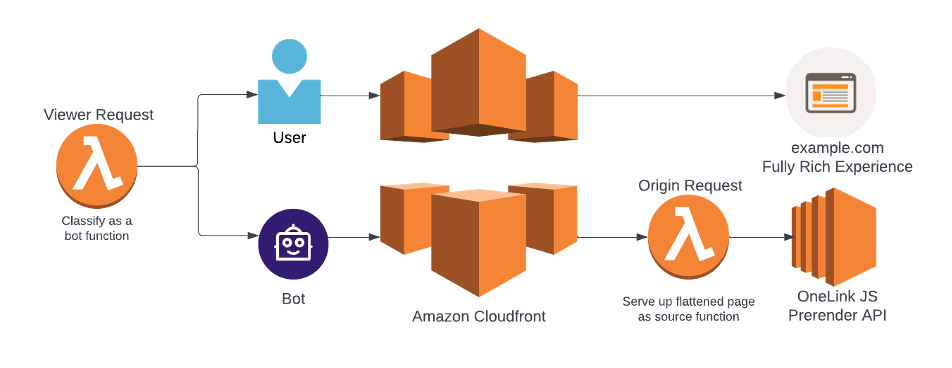
When a viewer request is sent to the CloudFront cache for a website that utilizes Bablic, a Lambda function triggers to check whether the requesting user agent is a bot or a human user.
If the requesting user-agent is a bot, another Lambda function will trigger in the origin request to flatten the page and serve a simplified HTML page for the bot to index. The “rich” JavaScript page will be served if the user-agent is a human user.
One other Lambda function during the viewer request can trigger for sub-folder deployments only. If the entire site is not in scope, then the Lambda function checks to see if the page that is being requested is in scope or not. If the page is in scope, the second Lambda function will trigger during the origin request and flatten the page. If the page is not in scope, the second Lambda request will not trigger, and the page will remain rich.
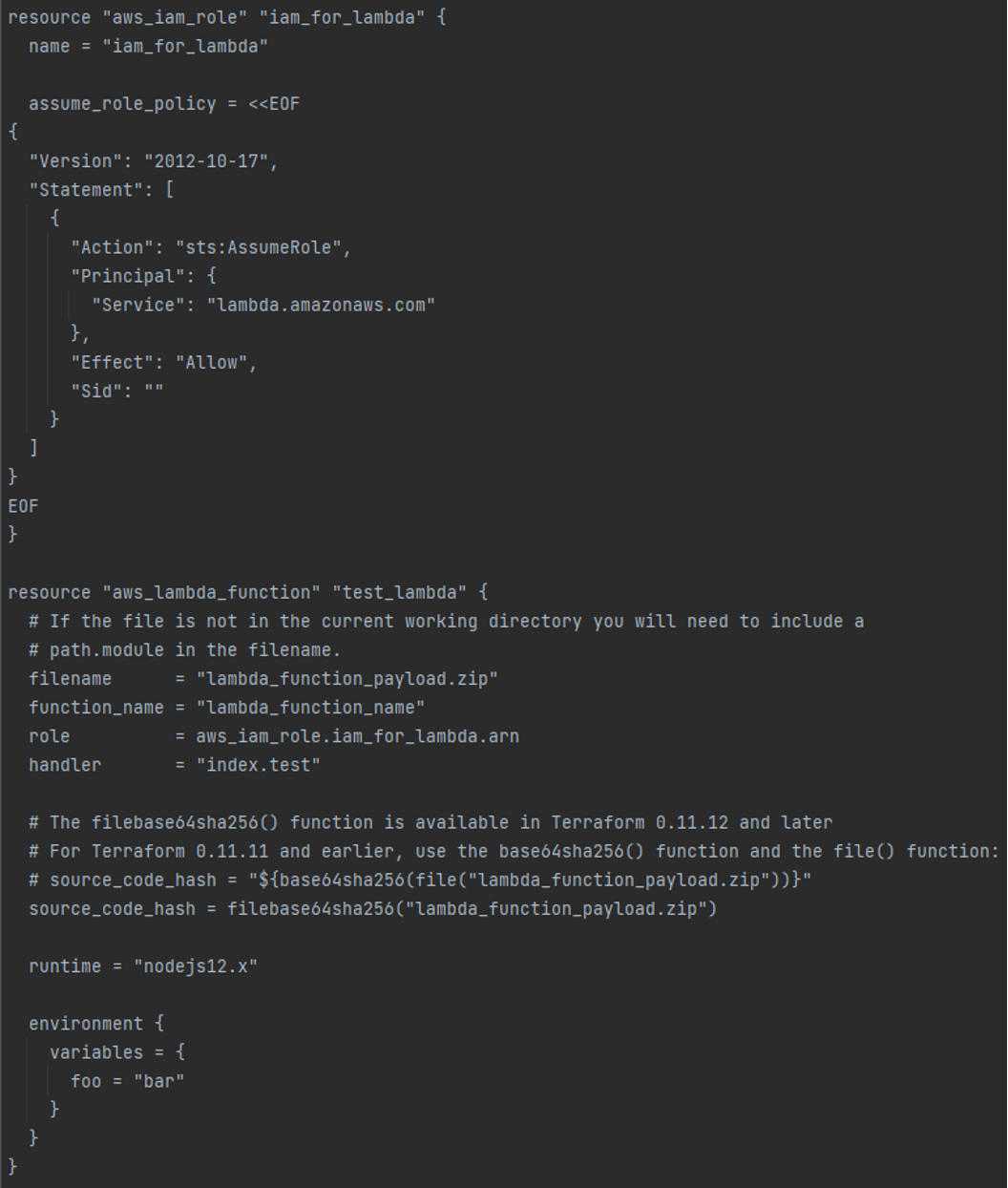
To integrate this functionality, you will need to utilize Terraform, which allows you to create and update your Amazon web services infrastructure. Terraform will enable you to put the Lambda functions into the viewer and origin requests. The code snippets are included below.
Terraform Config Declaring Lambda Resource Ex.
Viewer Request Function:
'use strict';

/** Viewer Request **/

/*
 * This header MUST be included in a CloudFront cache policy to create separate cache entries for bots and
 * regular users and both this header and the Host header MUST be included in an origin request policy.
 * Both of these policies must be enabled on the CloudFront distribution as well.
 *
 * How to create a CloudFront cache policy:
 * https://docs.aws.amazon.com/AmazonCloudFront/latest/DeveloperGuide/controlling-the-cache-key.html
 * How to create a CloudFront origin request policy:
 * https://docs.aws.amazon.com/AmazonCloudFront/latest/DeveloperGuide/controlling-origin-requests.html
 */
const customHeaderName = 'OneLink-JS-Prerender';

exports.handler = (event, context, callback) => {
   const { Records: [{ cf: { request } }] } = event;
   const { headers, uri } = request;
   const { 'user-agent': [{ value: userAgent } = {}] = []} = headers;

   const userAgentRegex = new RegExp(/([Bb]ot|[Ss]pider|slurp|archiver)/);

   /*
     * This regex is for sub-folder deployments only. Make sure to include all lang/locale pairs.
     * Also, this regex is redundant in cases where CloudFront distributions are correctly configured
     * with pattern matching behaviors:
     * https://docs.aws.amazon.com/AmazonCloudFront/latest/DeveloperGuide/distribution-web-values-specify.html?icmpid=docs_cf_help_panel#DownloadDistValuesPathPattern
     */
   const uriRegex       = new RegExp('^/({language folders bar seperated})');

   headers[customHeaderName.toLowerCase()] = [{
      key: customHeaderName,
      value: (uriRegex.test(uri) && userAgentRegex.test(userAgent)).toString()
   }];

   callback(null, request);
Origin Request Function:
'use strict';

/** Origin Request **/
const projectKey = '____-____-____-____';
const flattenKey = `P${projectKey}`;
// const TransPerfectDomain = 'www.onelink-edge.com'; // <- The current EC2 XAPIS
// const TransPerfectDomain = 'xapis.onelinkjs.com';  // <- The container XAPIS

exports.handler = (event, context, callback) => {
   const { Records: [{ cf: { request } }] } = event;
   const { headers, uri } = request;
   const {
      host: [{ value: host }],
      'onelink-js-prerender': [{ value: oneLinkJSPrerender }]
   } = headers;

   if (oneLinkJSPrerender === 'true') {
      request.querystring = `url=//${host}${uri}`;

      /* Set custom origin fields */
      request.origin = {
         custom: {
            domainName: TransPerfectDomain,
            port: 443,
            protocol: 'https',
            path: '',
            sslProtocols: ['TLSv1', 'TLSv1.1'],
            readTimeout: 5,
            keepaliveTimeout: 5,
            customHeaders: {}
         }
      };

      request.uri = `/xapis/Flatten/${flattenKey}`;
      headers.host = [{ key: 'host', value: TransPerfectDomain }];
   }

   callback(null, request);
};
Cloudflare Workers
This guide shows how to deploy a Cloudflare Worker that detects known crawlers/bots via the User‑Agent and, for those requests, fetches a prerendered version of the page from an API. Normal users receive your origin content untouched.
- Worker docs: https://workers.cloudflare.com/
- Local dev and deploy: https://developers.cloudflare.com/workers/wrangler/
Overview:
- Goal: Serve SEO/social crawlers fast, static HTML (prerender) while keeping human traffic dynamic.
- Detection: Simple User‑Agent regex (bot|spider|slurp|archiver, case‑insensitive). Adjust as needed.
- Prerender Source: https://www.onelink-edge.com/xapis/Flatten/<YOUR-FLATTEN-KEY>?url=<encoded target URL>
- Pass‑through: Non‑bots are proxied to your origin as‑is.
Prerequisites:
- Cloudflare account with a zone (domain) or workers.dev subdomain.
- Wrangler v3+ installed:
npm i -g wrangler
Worker code:
Create src/worker.js (or .ts) with the following minimal logic:
export default {
 async fetch(request) {
   const botRegex = /(bot|spider|slurp|archiver)/i;
   const userAgent = request.headers.get("User-Agent") || "";
   // If the requester looks like a bot/crawler, return prerendered HTML
   if (botRegex.test(userAgent)) {
     const reqUrl = new URL(request.url);
     const flattenKey = "PXXXX-XXXX-XXXX-XXXX"; // This is your project key
     const flattenURL = `https://www.onelink-edge.com/xapis/Flatten/${flattenKey}?url=${encodeURIComponent(reqUrl.href)}`;
     // Forward lightweight context headers if desired
     const prerenderResp = await fetch(flattenURL, {
       headers: {
         "User-Agent": userAgent,
         "Accept": request.headers.get("Accept") || "text/html,application/xhtml+xml,application/xml;q=0.9,*/*;q=0.8",
       },
     });
     return prerenderResp; // returns prerendered HTML to the bot
   }
   // Humans: just proxy to origin (or your existing routes/Pages)
   return fetch(request);
 },
};
Wrangler configuration:
Create wrangler.toml in your project root:
name = "dynamic-rendering"
main = "src/worker.js"
compatibility_date = "2025-10-21"

# Option A: Deploy to workers.dev
# Uncomment the next line to create a workers.dev route
# workers_dev = true

# Option B: Bind to a zone route in production
# Replace with your domain and (optionally) zone_id
# route = { pattern = "example.com/*", zone_name = "example.com" }
Then deploy:
# Preview locally
wrangler dev

# Publish
wrangler deploy
If you prefer environment separation, add sections like [env.production] with a route and zone_name or zone_id for your production domain.
How it works at runtime:
- Bots
- Worker matches User‑Agent.
- Worker calls Flatten API with the full, encoded URL: ?url=<encoded>.
- Response (prerendered HTML) is returned directly to the bot.
- Humans
- Worker proxies the request unchanged to your origin (or Cloudflare Pages), preserving method, path, query, and most headers.
Testing:
Response should differ by user-agent. The BOT user-agent should return prerendered HTML (i.e. translated and rendered), while the non-bot user-agent should return your origin/Pages response (i.e. untranslated and unrendered).
Bot simulation:
curl  'https://your-site.com/some/page' \
 -H 'User-Agent: Mozilla/5.0 (compatible; Googlebot/2.1; +http://www.google.com/bot.html)'
You should see the prerendered response.
Non-bot simulation:
curl 'https://your-site.com/some/page' -H 'User-Agent: Mozilla/5.0 (Macintosh; Intel Mac OS X)'
You should receive your origin/Pages response.
Production tips:
- Cache: Consider enabling Cloudflare caching of prerendered HTML (e.g., by setting Cache-Control headers at the prerender source) to reduce repeated prerender calls.
- Regex maintenance: Keep your bot list updated. Social crawlers sometimes don’t include the word "bot".
- Edge cases: If some clients spoof UAs, you can add allow/deny lists per path or query, or integrate with Cloudflare Bot Management (Business/Enterprise).
- Secrets: The Flatten key in the URL should be treated as a secret; store it in wrangler.toml via vars or secrets and reference via env in your Worker.
Using environment variables for the Flatten key (recommended)
wrangler.toml:
name = "dynamic-rendering"
main = "src/worker.js"
compatibility_date = "2025-10-21"

[vars]
FLATTEN_KEY = "PXXXX-XXXX-XXXX-XXXX" # replace via `wrangler secret put` in real deployments
Worker:
export default {
 async fetch(request, env) {
   const botRegex = /(bot|spider|slurp|archiver)/i;
   const ua = request.headers.get("User-Agent") || "";

   if (botRegex.test(ua)) {
     const u = new URL(request.url);
     const flattenURL = `https://www.onelink-edge.com/xapis/Flatten/${env.FLATTEN_KEY}?url=${encodeURIComponent(u.href)}`;
     return fetch(flattenURL, { headers: { "User-Agent": ua } });
   }

   return fetch(request);
 },
};
With this Worker in place, bots receive fully prerendered content for optimal SEO and share previews, while human users continue to get your fast, dynamic application.